Discuss Through WhatsApp
The file first.cc is the official introductory simulation provided in the official ns-3 tutorial. It is deliberately simple, yet it demonstrates all core concepts of ns-3: discrete-event simulation, nodes, links, protocol stacks, addressing, applications, logging, and simulation control. By fully understanding this single script, a beginner gains a strong foundation for all future ns-3 simulations.
The Following AI Comprehension Explains the concept of p2p Networking Simulation under ns-3.
The following is the network topology that the first.cc is going to simulate.

This section explains the design philosophy, simulation flow, and technical meaning of every component used in first.cc.
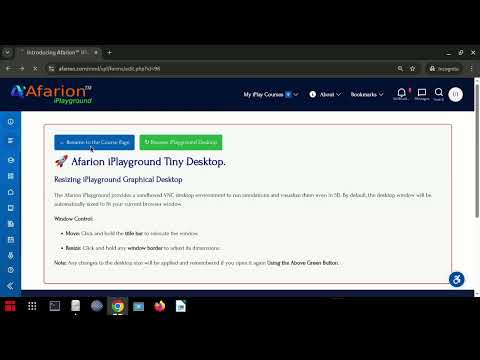
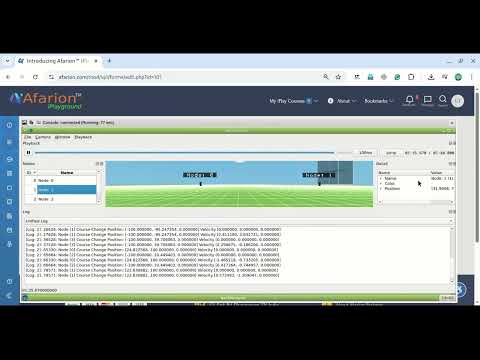
You can directly run the simulation at Afarion iPlayground and then try to understand the aspects of this simulation from the explanation given below.
The following video gives an introduction to Afarion iPlayground:
ns-3 Simulation Script: first.cc
/*
 * SPDX-License-Identifier: GPL-2.0-only
 */

#include "ns3/applications-module.h"
#include "ns3/core-module.h"
#include "ns3/internet-module.h"
#include "ns3/network-module.h"
#include "ns3/point-to-point-module.h"

// Default Network Topology
//
//       10.1.1.0
// n0 -------------- n1
//    point-to-point
//

using namespace ns3;

NS_LOG_COMPONENT_DEFINE("FirstScriptExample");

int
main(int argc, char* argv[])
{
    CommandLine cmd(__FILE__);
    cmd.Parse(argc, argv);

    Time::SetResolution(Time::NS);
    LogComponentEnable("UdpEchoClientApplication", LOG_LEVEL_INFO);
    LogComponentEnable("UdpEchoServerApplication", LOG_LEVEL_INFO);

    NodeContainer nodes;
    nodes.Create(2);

    PointToPointHelper pointToPoint;
    pointToPoint.SetDeviceAttribute("DataRate", StringValue("5Mbps"));
    pointToPoint.SetChannelAttribute("Delay", StringValue("2ms"));

    NetDeviceContainer devices;
    devices = pointToPoint.Install(nodes);

    InternetStackHelper stack;
    stack.Install(nodes);

    Ipv4AddressHelper address;
    address.SetBase("10.1.1.0", "255.255.255.0");

    Ipv4InterfaceContainer interfaces = address.Assign(devices);

    UdpEchoServerHelper echoServer(9);

    ApplicationContainer serverApps = echoServer.Install(nodes.Get(1));
    serverApps.Start(Seconds(1));
    serverApps.Stop(Seconds(10));

    UdpEchoClientHelper echoClient(interfaces.GetAddress(1), 9);
    echoClient.SetAttribute("MaxPackets", UintegerValue(1));
    echoClient.SetAttribute("Interval", TimeValue(Seconds(1)));
    echoClient.SetAttribute("PacketSize", UintegerValue(1024));

    ApplicationContainer clientApps = echoClient.Install(nodes.Get(0));
    clientApps.Start(Seconds(2));
    clientApps.Stop(Seconds(10));

    Simulator::Run();
    Simulator::Destroy();
    return 0;
}
Purpose of the Tutorial Simulation
The goal of this simulation is to model a very simple network:
- Two nodes connected by a point-to-point link
- One node runs a UDP Echo Server
- The other node runs a UDP Echo Client
- A single packet is sent from the client to the server
- The server echoes the packet back
Even though the network is simple, the simulation exercises all layers of the network stack and demonstrates how ns-3 executes simulations using Discrete Event Simulation (DES).
Simulation Topology Overview
The following illustrates the simulated network topology with some additional details.
        10.1.1.0 / 24   (Point-to-Point Network)
────────────────────────────────────────────────────

   ┌───────────────┐        5 Mbps, 2 ms        ┌───────────────┐
   │               │============================│               │
   │   Node n0     │        P2P Channel         │   Node n1     │
   │   (Client)    │                            │   (Server)    │
   │               │                            │               │
   │ IP: 10.1.1.1  │                            │ IP: 10.1.1.2  │
   │ UDP Echo      │                            │ UDP Echo      │
   │ Client        │                            │ Server        │
   │ Port: Ephem.  │                            │ Port: 9       │
   └───────────────┘                            └───────────────┘
The client will be assigned to an ephemeral port number.
An ephemeral port is a temporary, automatically assigned source port used by a client application when it initiates a connection or sends a packet.
-
Chosen by the OS / network stack
-
Exists only for the duration of the communication
-
Not fixed or well-known
-
Used to uniquely identify the client-side socket
Module Inclusion and Design Philosophy
#include "ns3/core-module.h"
#include "ns3/network-module.h"
#include "ns3/internet-module.h"
#include "ns3/point-to-point-module.h"
#include "ns3/applications-module.h"
ns-3 is organized into modules, each representing a logical subsystem.
core-moduleprovides the simulation engine, time handling, logging, and event schedulernetwork-moduledefines fundamental abstractions like Node, NetDevice, and Packetinternet-moduleprovides TCP/IP protocol stack (IPv4, UDP, routing)point-to-point-modulemodels wired point-to-point linksapplications-moduleprovides traffic-generating applications such as UDP Echo
This modular design allows ns-3 simulations to be lightweight, extensible, and realistic.
Logging and Debug Support
NS_LOG_COMPONENT_DEFINE("FirstScriptExample");
This line defines a logging component for this simulation. Logging in ns-3 is a controlled debugging mechanism that allows selective output without modifying simulation logic.
Later, logging is enabled using:
LogComponentEnable("UdpEchoClientApplication", LOG_LEVEL_INFO);
LogComponentEnable("UdpEchoServerApplication", LOG_LEVEL_INFO);
This ensures that application-level events, such as packet send and receive, are printed during simulation.
Command Line Support
CommandLine cmd(__FILE__);
cmd.Parse(argc, argv);
This enables runtime parameter control using command-line arguments. Although not heavily used in this example, it demonstrates good simulation practice and allows easy extension of experiments without recompiling.
Time Resolution and Discrete Event Simulation
Time::SetResolution(Time::NS);
ns-3 is a Discrete Event Simulator, meaning:
- Simulation time advances only when events occur
- Time is not continuous
- Events are processed in timestamp order
Here, time resolution is set to nanoseconds, allowing precise modeling of communication delays.
Node Creation
NodeContainer nodes;
nodes.Create(2);
A Node represents a networked system (router, host, sensor, etc.).
NodeContaineris a helper class- Two nodes (
n0andn1) are created - At this stage, nodes have no protocols, no IP, and no links
Link Creation Using Point-to-Point Helper
PointToPointHelper pointToPoint;
pointToPoint.SetDeviceAttribute("DataRate", StringValue("5Mbps"));
pointToPoint.SetChannelAttribute("Delay", StringValue("2ms"));
This helper abstracts the creation of:
- Network interface cards (NetDevices)
- Communication channel
Attributes:
- DataRate models transmission capacity
- Delay models propagation delay
This separation mirrors real network hardware behavior.
Installing Devices on Nodes
NetDeviceContainer devices;
devices = pointToPoint.Install(nodes);
Each node receives:
- One network interface
- Connected by a shared channel
This step creates the physical and data-link layers of the network.
Installing the Internet Protocol Stack
InternetStackHelper stack;
stack.Install(nodes);
This installs:
- IPv4
- UDP
- Routing protocols (static routing by default)
Without this step, nodes cannot understand IP packets or communicate logically.
IP Address Assignment
Ipv4AddressHelper address;
address.SetBase("10.1.1.0", "255.255.255.0");
Ipv4InterfaceContainer interfaces = address.Assign(devices);
This assigns:
10.1.1.1ton010.1.1.2ton1
IP addressing is essential for routing and transport-layer communication.
Application Layer: UDP Echo Server
UdpEchoServerHelper echoServer(9);
ApplicationContainer serverApps = echoServer.Install(nodes.Get(1));
serverApps.Start(Seconds(1));
serverApps.Stop(Seconds(10));
The server:
- Listens on UDP port 9
- Starts at simulation time 1 second
- Stops at 10 seconds
This scheduling is a direct demonstration of DES: application start and stop are events.
Application Layer: UDP Echo Client
UdpEchoClientHelper echoClient(interfaces.GetAddress(1), 9);
echoClient.SetAttribute("MaxPackets", UintegerValue(1));
echoClient.SetAttribute("Interval", TimeValue(Seconds(1)));
echoClient.SetAttribute("PacketSize", UintegerValue(1024));
Client behavior:
- Sends one packet
- Packet size: 1024 bytes
- Destination: server IP and port
Installed on node n0:
clientApps.Start(Seconds(2));
clientApps.Stop(Seconds(10));
The client starts after the server, ensuring proper synchronization.
Simulation Execution and Cleanup
Simulator::Run();
Simulator::Destroy();
Run()starts the DES engine- Events are executed in time order
Destroy()cleans all simulation objects
No real time passes; simulation time jumps between events.
Key Concepts Demonstrated by This Simulation
This single script demonstrates:
- Discrete Event Simulation
- Network layering
- Separation of topology, protocol, and application
- Time-based behavior modeling
- Reproducible experiments
- Realistic protocol behavior
Why This Simulation Is Important for Beginners
The first.cc simulation is intentionally simple, but it introduces the entire ns-3 workflow. Every advanced ns-3 simulation—wireless networks, mobility, LoRaWAN, satellite communication—builds upon these exact concepts.
Mastering this script means understanding how ns-3 thinks about networks, time, and events.
For example, the following are the event breakdown of one such execution of the first.cc simulation.
Event Breakdown
| Time (s) | Node | Event | NetAnim Visual |
|---|---|---|---|
| 2.00000 | Client | Tx | Arrow leaving node |
| 2.00369 | Server | Rx | Packet arrives |
| 2.00369 | Server | Tx | Arrow immediately leaves |
| 2.00737 | Client | Rx | Packet arrives |
If you notice the time stamp, the Tx and Rx happen at the same time. (but it is not possible in a practical physical network)
🧠 Why Tx & Rx share the same timestamp?
This is classic ns-3 DES behavior:
- The receive event triggers the send event
- No
Simulator::Schedule(delay, ...)at server - So both occur at t = 2.00369 s
- But to simulate realistic practical physical network, ns-3 can simulate application delay, propagation delay etc., so that the events will happen in a more natural way. So, the researchers should imagine such aspects while planning a realistic network simulation.
 Take Me to Afarion ns-3 iPlayground